
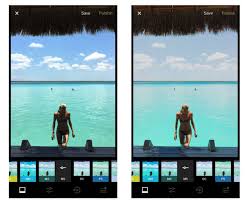
For Download
VSCO: Photo Editor (often referred to just as VSCO) is a popular, community-driven platform known for its high-quality photo and video editing tools, especially its distinctive film-inspired presets. It serves as both a powerful editor and a creative social network.
Here is a full breakdown of its features, community aspect, and pricing:
I. Key Features & Tools
1. Presets (Filters)
Film-Inspired Aesthetic: VSCO is most famous for its presets, which are essentially high-quality filters designed to mimic the look of classic analog film stocks (like Kodak, Fuji, Agfa). They give photos a unique, moody, or cinematic feel.
Preset Library: The free version includes a selection of basic presets. VSCO Membership (Plus or Pro) unlocks a library of 200+ premium presets.
Film X: An advanced set of presets available to members that allows for fine-tuning of characteristics like Strength, Character, and Warmth, mimicking the unpredictability and personality of real film.
Recipes: Users can save and name a specific set of edits (preset + adjustments) to easily apply them to multiple photos for a consistent look.
2. Photo Editing Tools
VSCO offers a comprehensive suite of editing tools, ranging from basic to advanced:
Basic Tools (Available in Free Version): Exposure, Contrast, Saturation, Crop, Skew, Sharpen, Fade, Highlights, and Shadows.
Advanced Tools (Mostly Member-Exclusive):
HSL (Hue, Saturation, Luminance): Precise control over individual colors in your image.
Dodge & Burn: Tools to selectively lighten (Dodge) or darken (Burn) areas of a photo.
Split Tone: Allows separate color tinting for the highlights and shadows.Grain: Adds a realistic film-like texture. Borders: Frame your images with customizable colors.
3. Video & Multimedia Editing
Video Editor: Members can apply the same premium VSCO presets and most advanced editing tools (like HSL, exposure, etc.) to short videos.
Collage and Montage: Tools to create layered multimedia collages using photos, videos, text, and shapes.
II. Community and Social Features
VSCO offers a creative community that is distinct from traditional social media:
Emphasis on Creativity over Popularity: VSCO famously hides likes counts and public follower counts. This de-emphasizes the pressure of “going viral” or seeking validation, encouraging users to focus purely on artistic expression and high-quality photography.
Sharing (The Feed): Users can share their edited photos and videos to their public profile and the main VSCO feed.
Interactions: Users can “Favorite” (like) or “Repost” another user’s content, but these metrics are not prominently displayed to the public.
VSCO Spaces: Collaborative galleries that can be public or private. They function as a place for creators to share work, brainstorm ideas, get feedback, and connect with other creatives around a specific theme or project.
III. Pricing and Membership Tiers
VSCO operates with a free tier and paid subscriptions (Membership):
Tier Key Features
Free (Starter) Basic editing tools, a selection of presets (approx. 15), a public profile, ability to join community Spaces
Plus Membership 200+ Presets and advanced mobile editing tools (HSL, Split Tone, etc.), unlimited Recipes, full community access, and video editing capabilities.
Pro Membership Includes everything in Plus, plus: a full suite of tools on mobile and desktop, Pro Presets with refined controls, Adobe Lightroom integration, cloud sync, professional profile features (Galleries, Blogs, Client Spaces), and work opportunities via Hub.
Export to Sheets
Note: Pricing is generally available as monthly or annual subscriptions, with the annual rate being more cost-effective.
IV. History and Philosophy
Founding: Launched in 2011 by Joel Flory and Greg Lutze. It began with desktop presets for professional photographers before launching the mobile app (originally called VSCO Cam).