
For DownLoad
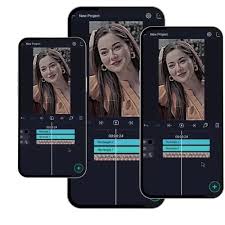
Alight Motion is a powerful and specialized mobile application designed primarily for motion graphics, professional-quality animation, and video compositing.1 Unlike simpler video editors, it provides a comprehensive toolset that brings many features of desktop animation software to smartphones and tablets.
2Here is a full, detailed breakdown of Alight Motion: I. Core Identity: Motion Design for MobileAlight Motion is often described as the first professional motion design app for mobile devices (iOS, iPadOS, and Android).3 Its focus is on highly customizable visual effects and precise control over movement
.4Primary Focus: Animation, motion graphics, and visual effects (VFX).5Target Audience: Advanced mobile editors, animators, and creators who need detailed control over effects, keyframes, and layers. 6Availability: Available on iOS (iPhone/iPad), macOS (with Apple Silicon), and Android 7II. Key Features and CapabilitiesAlight Motion’s strength lies in its advanced tools that offer granular control over every element:81.
Professional Animation & KeyframingKeyframe Animation: This is the heart of the app.9 Keyframe animation is available for all settings (position, rotation, scale, color, effects, and more), allowing users to define the starting and ending points of a smooth transition.10Animation Easing/Timing Curves: Provides preset easing curves or the ability to build custom timing curves for highly fluid and realistic motion, which is crucial for professional animation.11Velocity-Based Motion Blur:
Automatically applies a realistic blur to objects in motion, enhancing the smoothness and quality of the animation 122. Layers and Compositing13Multiple Layers: Supports multiple layers of graphics, video, audio, and text, enabling complex compositing.14Vector and Bitmap Support: Users can not only import but also edit vector graphics directly within the app, which is a rare and powerful feature for a mobile editor.15Grouping and Masks:Grouping: Combine multiple layers into a single group to apply effects or transformations collectively.
16Masking: Use layers to define areas of visibility for other layers, essential for complex visual effects and cutouts.. 17Hierarchical Parenting: Allows linking layers (e.g., linking a character’s arm layer to its body layer) to easily rig and animate complex characters or objects 183. Visual Effects (VFX)19160+ Effect Building Blocks: Offers a vast library of basic effects that can be stacked and combined to create sophisticated, unique visual effects.20Customizable Effects: Effects like Blur, Shake, Glow, and Color Correction are highly customizable, acting as “building blocks” rather than fixed presets.21Cameras: Includes a virtual camera that can be animated to pan, zoom, and even support advanced depth-of-field effects like focus blur and fog.224.
Editing and Media Advanced Color Adjustment: Tools for detailed color grading, including control over contrast, brightness, shadows, and white balance. 23Drawing Tools: Tools for freehand drawing and creating vector shapes right in the project.. 24Text and Fonts: Supports custom fonts, giving creators complete control over typography.. 25III. Comparison to Traditional Editors (e.g., iMovie, CapCut)Alight Motion is distinctly different from user-friendly editors like iMovie or CapCut:26FeatureAlight Motion iMovie/CapCut (General)Primary Goal Motion Graphics & Custom Animation
. Quick video editing and social media content creation.Keyframe ControlAvailable for all properties (effects, color, position, etc.).Often limited to basic properties (position/scale) or preset movements. Learning CurveSteep—Requires significant time and skill investment due to the professional toolset.
Shallow—Designed for immediate use by beginners.CustomizationExtremely high; users can build custom effects from blocks. Lower relies heavily on a library of fixed, ready-made effects and templates.Vector EditingBuilt-in support.Not typically supported. IV.
Pricing and Subscription Model Alight Motion operates on a freemium model: Free Version: The app is free to download and use with basic features. 27Limitation: All exported videos will include a visible watermark. Limitation: Access to the full library of premium effects and features is restricted.
Paid Membership (Alight Motion Pro): Paid subscription options (often monthly or yearly) are available to unlock the full potential of the app.28Benefit: Removes the watermark 29Benefit: Grants access to the regularly updated library of premium effects, tools, and all professional features 30.
Export and Sharing Projects can be exported in several versatile formats, making it suitable for professional workflows:31Video: MP4 format 32Animation: GIF animation 33 Image Sequence: PNG sequences (for high-quality, frame-by-frame export).34Stills: Single image frames .Project Packages: Allows sharing the entire project file with other Alight Motion users for collaboration or to use as templates.