For Download
VivaVideo – Video Editor&Maker is a popular, all-in-one mobile video editing application designed for both beginners and professionals to create high-quality, eye-catching videos, reels, and slideshows. It is available for both Android and iOS devices.
Here is a full detail of its features, pricing model, and general use:
Key Features
VivaVideo is known for its extensive range of features, incorporating both standard editing tools and advanced, AI-powered functions.
1. Basic Video Editing:
Trim, Cut, Split, and Merge: Essential tools for manipulating video clips on a timeline.
Speed Control: Adjust video speed with customizable speed curves or smooth slow-motion effects.
Crop and Rotate: Arbitrarily change the video area and orientation.
Adjustments: Control brightness, contrast, saturation, and color.
2. AI-Powered Tools:
AI Auto Captions: Automatically generate speech-to-text captions and supports caption translation.
AI Auto Cutout/Background Remover: Automatically remove backgrounds from videos or isolate objects with smart strokes.
AI Music Generator: Create custom songs based on your ideas or lyrics.
Smart Tracking: Track moving objects to apply dynamic effects, text, or animations that follow the motion.
AI Enhancer: HD-enhance video quality.
AI Video Generator: Create effects like bringing life to photos (e.g., AI hug, AI kiss effects).
AI Voice Clone: Easily copy your voice to generate any speech with customized emotions and in any language.
3. Visual Effects & Media:
Filters & Effects: Apply movie-style filters and a variety of effects like Glitch, VHS, Retro DV, Blur, etc.
Transitions: Add smooth and fantastic transition effects between clips.
Keyframe Editing: Add custom keyframe animations for various elements (like position, rotation, transparency).
PIP (Picture-in-Picture): Add multiple layers of video, photos, stickers, or effects.
Text & Stickers: Add customizable text, subtitles, text animations, and an endless library of stickers and emojis.
Themes/Templates: Use various professionally designed templates, especially for trendy social media content like Reels and TikTok videos.
4. Audio Tools:
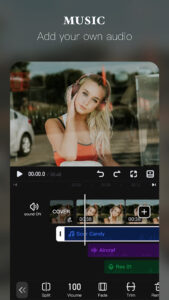
Music Library: Access a vast library of featured music and sound effects, including royalty-free options.
Voiceover: Record your own voice to add custom narration.
Extract Audio: Pull audio directly from video clips.
Volume Keyframe Adjustment: Control the volume changes within the video timeline.
5. Import/Export & Sharing:
High-Quality Export: Save videos in various resolutions, including 720p, Full HD 1080p, and 4K Ultra HD.
GIF Maker: Export creations as GIFs, sometimes with transparent backgrounds.
Direct Share: Easily save and share content directly to social media platforms like YouTube, Instagram, and TikTok.
Pricing Model
VivaVideo operates on a freemium model:
Free Version: The free version offers a wide range of basic and some advanced features. However, it typically has limitations such as:
Adding a watermark to the exported video.
Limiting the video duration (e.g., to 5 minutes).
Restricting the export quality (e.g., not allowing 4K export).
Limiting access to the full suite of VIP filters, effects, and tools.
VIP Subscription (Premium Version): Users can subscribe monthly or annually to unlock the full potential of the app. This generally includes:
Removal of the watermark.
Unlimited video length.
4K Ultra HD video export.
Access to all premium materials, filters, transitions, and AI-powered pro tools.
Ideal Users
VivaVideo is designed for a broad audience:
Social Media Creators: Excellent for quickly creating engaging short-form content for platforms like Instagram Reels, TikTok, and YouTube Shorts.
Vloggers and Amateurs: Its user-friendly interface makes it easy for beginners to perform basic edits, create slideshows, and add music and effects.
Professionals: The inclusion of advanced features like keyframe editing, smart tracking, and high-resolution export caters to users looking for more dynamic and polished results directly from their mobile device.